

 Wallet
 Login
Login
 Create Account


Caribbean Islands eSIMs
 Digicel
- If you're running low, you can always top up
- The package starts when you connect to a supported network
 Afghanistan
Africa
Africa Safari
Afghanistan
Africa
Africa Safari
 Albania
 Algeria
 Andorra
 Anguilla
 Antigua and Barbuda
 Argentina
 Armenia
 Aruba
Asia
Aruba
Asia
 Australia
 Austria
 Azerbaijan
Azores
Azerbaijan
Azores
 Bahamas
 Bahrain
 Bangladesh
 Barbados
 Belarus
 Belgium
 Belize
 Benin
Benin
 Bermuda
 Bhutan
 Bolivia
 Bosnia and Herzegovina
 Botswana
 Brazil
 British Virgin Islands
 Brunei
 Bulgaria
 Burkina Faso
 Cambodia
 Cameroon
 Canada
Canary Islands
Canada
Canary Islands
 Canary Islands
 Cape Verde
Caribbean Islands
Cape Verde
Caribbean Islands
 Caribbean Netherlands
 Cayman Islands
 Central African Republic
 Chad
Chad
 Chile
Chile
 China
China
 Colombia
 Congo (Brazzaville)
 Congo (Kinshasa)
 Costa Rica
 Croatia
 Cuba
Cuba
 Curaçao
 Cyprus
 Czechia
 Côte d'Ivoire
 Denmark
Discover Global
Denmark
Discover Global
 Dominica
 Dominican Republic
 Ecuador
 Egypt
Egypt
 El Salvador
 Estonia
 Eswatini
 Ethiopia
Europe
European Union and United Kingdom
Ethiopia
Europe
European Union and United Kingdom
 Faroe Islands
 Fiji
Fiji
 Finland
 France
 French Guiana
 Gabon
Gabon
 Gambia
 Georgia
 Germany
 Ghana
Ghana
 Gibraltar
Global
Gibraltar
Global
 Greece
 Greenland
 Grenada
 Guadeloupe
 Guam
Guam
 Guatemala
 Guernsey
 Guinea
 Guinea-Bissau
 Guyana
 Haiti
Haiti
 Honduras
 Hong Kong
 Hungary
 Iceland
 India
India
 Indonesia
 Iraq
Iraq
 Ireland
 Isle of Man
 Israel
 Italy
Italy
 Jamaica
 Japan
Japan
 Jersey
 Jordan
 Kazakhstan
 Kenya
Kenya
 Kuwait
 Kyrgyzstan
 Laos
Latin America
Laos
Latin America
 Latvia
 Lebanon
 Lesotho
 Liberia
 Liechtenstein
 Lithuania
 Luxembourg
 Macau
Macau
 Madagascar
Madeira
Madagascar
Madeira
 Malawi
 Malaysia
 Maldives
 Mali
Mali
 Malta
Marie Galante
Malta
Marie Galante
 Martinique
 Mauritania
 Mauritius
 Mayotte
 Mexico
Middle East and North Africa
Mexico
Middle East and North Africa
 Moldova
 Monaco
 Mongolia
 Montenegro
 Montserrat
 Morocco
 Mozambique
 Namibia
 Nauru
Nauru
 Nepal
Nepal
 Netherlands
 Netherlands Antilles
 New Zealand
 Nicaragua
 Niger
Niger
 Nigeria
North America
Nigeria
North America
 North Macedonia
Northern Cyprus
North Macedonia
Northern Cyprus
 Norway
Oceania
Norway
Oceania
 Oman
Oman
 Pakistan
 Palestine
 Panama
 Papua New Guinea
 Paraguay
 Peru
Peru
 Philippines
 Poland
 Portugal
Puerto Rico
Portugal
Puerto Rico
 Puerto Rico
 Qatar
Qatar
 Romania
 Russia
 Rwanda
 Réunion
Saba
Réunion
Saba
 Saint Barthélemy
 Saint Kitts and Nevis
 Saint Lucia
 Saint Martin
 Saint Vincent and the Grenadines
 Samoa
Samoa
 Saudi Arabia
Scotland
Saudi Arabia
Scotland
 Senegal
 Serbia
 Seychelles
 Sierra Leone
 Singapore
Sint Eustatius
Singapore
Sint Eustatius
 Sint Maarten
 Slovakia
 Slovenia
 South Africa
 South Korea
 Spain
Spain
 Sri Lanka
 Sudan
Sudan
 Suriname
 Sweden
 Switzerland
 Taiwan
 Tajikistan
 Tanzania
 Thailand
 Timor-Leste
 Togo
Togo
 Tonga
Tonga
 Trinidad and Tobago
 Tunisia
 Turkey
 Turks and Caicos Islands
 U.S. Virgin Islands
 Uganda
 Ukraine
 United Arab Emirates
 United Kingdom
 United States
 Uruguay
 Uzbekistan
 Vanuatu
 Vatican City
 Venezuela
 Vietnam
 Zambia
 Åland Islands
Choose your package
No packages in this category right now.
Need broader coverage?
Explore our regional and global eSIMs. Packages start from the shown price and include coverage for the selected location.
Why travelers choose RshopRefills eSIMs
Local, regional & global coverage for 200+ destinations
Flexible packages, including unlimited data options

Pay in your currency or crypto, translated into 80+ languages
Easy install and set up to get connected in minutes
Frequently asked questions
Go to help centerWhen should I install my eSIM?
You can install your eSIM as soon as you receive the QR code by email. Most plans only start counting down once you arrive and connect to a supported network, so installing early is safe.
How do I use my eSIM?
Open your phone settings, add a cellular/mobile plan, and scan the QR code we email you. Turn on data roaming for the eSIM line and you are connected.
Can I reuse my eSIM?
If your plan supports top-ups you can add more data to the same eSIM. Otherwise, buy a fresh package whenever you travel again.
What are renewals?
Some packages can be renewed or topped up before they expire so you stay connected without installing a new eSIM.
Support
Need help? We offer 24/7, multi-language support.
How to add your eSIM
Three quick steps and you are roaming on local rates. No SIM tray, no queues at the airport kiosk.
-
 1
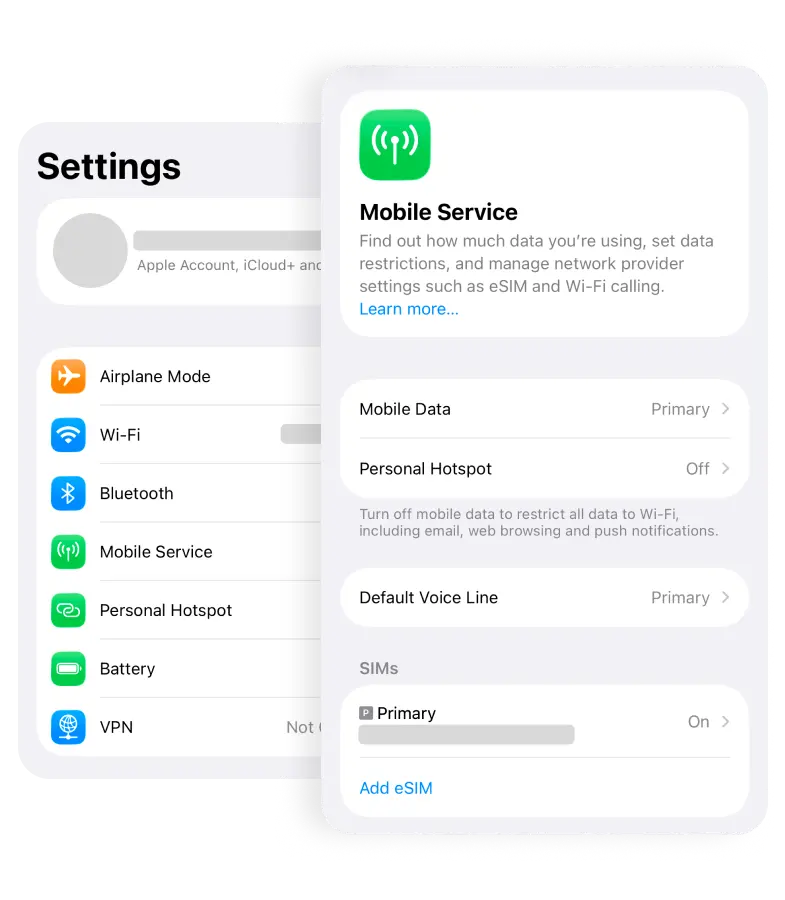
1Open Settings → Mobile Service
Unlock your phone and tap Mobile Service (or Cellular on older iPhones). This is where every line on your device already lives.
-
 2
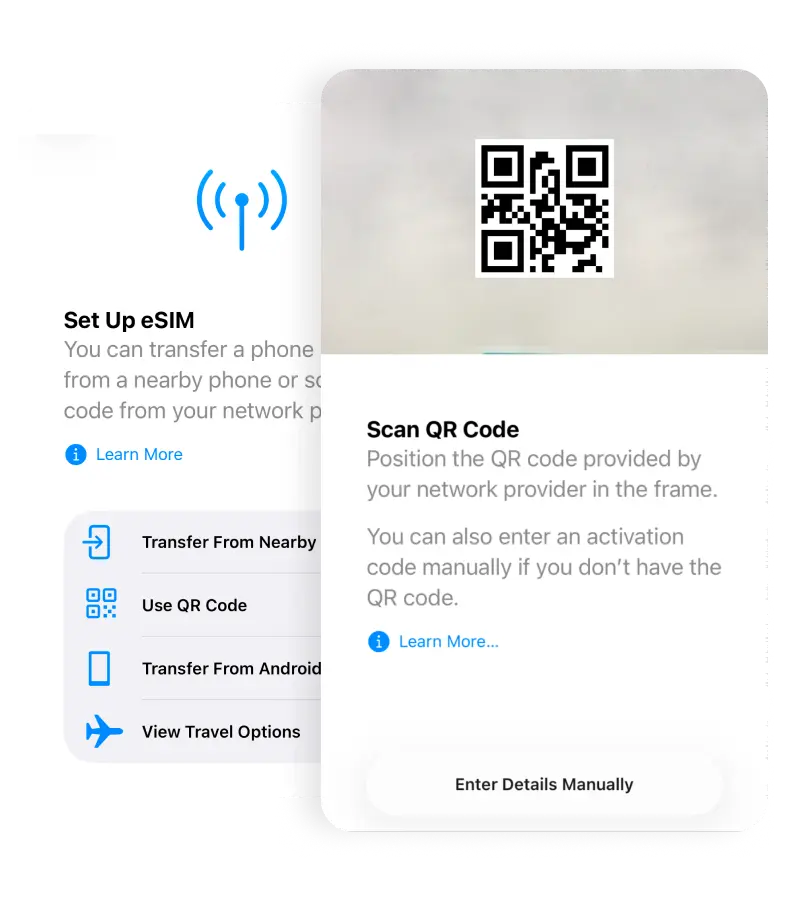
2Tap Add eSIM and scan your QR code
We email the QR code seconds after checkout. Point your camera at it, or tap Enter Details Manually to paste the code instead.
-
 3
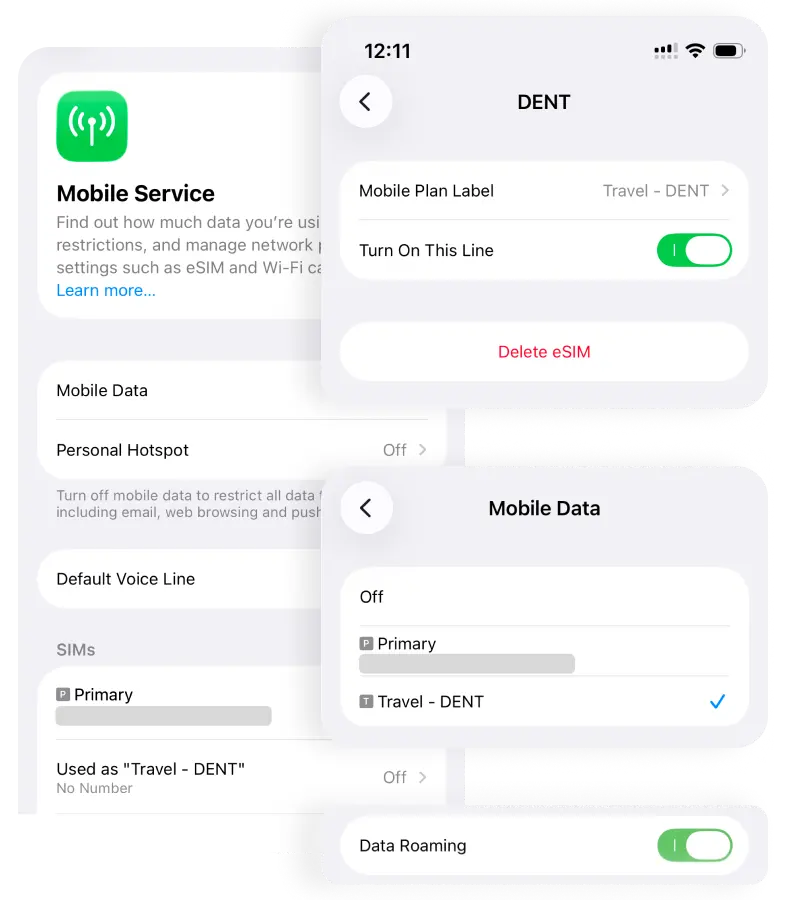
3Turn it on, switch on Data Roaming
Flip Turn On This Line, then enable Data Roaming for the new line. The moment you land, your phone connects at local rates.
Anonymous eSIM with MOMO, Cards, Crypto and more. No KYC required.
Unlike traditional SIM cards that ask for a passport and personal details, your RshopRefills eSIM can be bought with mobile money, cards, crypto and more. No identity verification, no personal data collected.
-
No KYC required
Buy instantly without ID verification or personal information.
-
Pay your way
Mobile money, cards, Apple Pay, bank transfer or crypto (Bitcoin, Ethereum, Tether, BNB, Solana, Litecoin). Your call.
-
Instant delivery
Receive your eSIM QR code in your inbox the moment your payment confirms.
Payment methods we accept
Pay with crypto or your local card. Settle in seconds, anywhere in the world.
 Mobile Money
 Card
Card
 Apple Pay
 Bank
Bank
 Bitcoin
 Ethereum
 Tether
 Solana
 BNB
BNB
 Litecoin
Total
0.00
Networks
This eSIM may switch between the following networks based on availability and speed. You can adjust this in your device settings.
-
Digicel
4G
-
Aliv
4G
-
U-Mobile
4G
-
Telcell N.V.
4G
-
Tigo
4G
-
Claro
4G
Check compatibility
To use an eSIM, a device must meet the following conditions:
- The device supports eSIMs.
- The device is not carrier or network-locked.
- The device is not jailbroken (iOS) or rooted (Android).
Use the list to check if your device is eSIM-compatible. Some regional models may differ, so confirm with your manufacturer if unsure.
iPad 10th Gen
iPad 8th Gen (WiFi+Cellular)
iPad Air 11-inch (M2)
iPad Air 13-inch (M2)
iPad Air 3rd Gen
iPad Air 4th Gen (WiFi+Cellular)
iPad Air 5th Gen (WiFi+Cellular)
iPad mini (6th Gen)
iPad mini 5th Gen
iPad Pro 11 inch 3rd Gen
iPad Pro 11 inch 3rd Gen (1TB, WiFi+Cellular)
iPad Pro 11 inch 3rd Gen (WiFi+Cellular)
iPad Pro 11 inch 4th Gen
iPad Pro 11 inch 4th Gen (WiFi+Cellular)
iPad Pro 11-inch (M4)
iPad Pro 12.9 inch 3rd Gen (1TB, WiFi+Cellular)
iPad Pro 12.9 inch 3rd Gen (WiFi+Cellular)
iPad Pro 12.9 inch 4th Gen (WiFi+Cellular)
iPad Pro 12.9 inch 5th Gen
iPad Pro 12.9 inch 6th Gen
iPad Pro 13-inch (M4)
iPhone 11
iPhone 11 Pro
iPhone 11 Pro Max
iPhone 12
iPhone 12 Mini
iPhone 12 Pro
iPhone 12 Pro Max
iPhone 13
iPhone 13 Mini
iPhone 13 Pro
iPhone 13 Pro Max
iPhone 14
iPhone 14 Plus
iPhone 14 Pro
iPhone 14 Pro Max
iPhone 15
iPhone 15 Plus
iPhone 15 Pro
iPhone 15 Pro Max
iPhone 16
iPhone 16 Plus
iPhone 16 Pro
iPhone 16 Pro Max
iPhone 16e
iPhone 17
iPhone 17 Air
iPhone 17 Pro
iPhone 17 Pro Max
iPhone Air
iPhone SE 2nd Gen
iPhone SE 3rd Gen
iPhone XR
iPhone XS
iPhone XS Max
iPhone XS Max Global
ABCTECH
X20
Alcatel
V3 Ultra
Asus
ZenFone Max Pro M1 (ZB602KL) (WW) / Max Pro M1 (ZB601KL) (IN)
ZenFone Max Pro M2 (ZB631KL) (WW) / Max Pro M2 (ZB630KL) (IN)
ASUS Zenfone 12 Ultra
BALMUDA
BALMUDA Phone
bq
Aquaris X2
Aquaris X2 PRO
CIBER
B610A115
Covia
CP-G3
DOOGEE
V30
dtab
dtab d-51C
Energizer
Hardcase H620S
Evolveo
EVOLVEO StrongPhone G9
Fairphone
Fairphone4
FCNT
arrows BZ03
arrows N F-51C
arrows We A101FC
Fossil
Fossil Gen 5 LTE
Gigaset
Gigaset GX4 PRO
Pixel 2
Pixel 2 XL
Pixel 3
Pixel 3 XL
Pixel 3a
Pixel 3a XL
Pixel 4
Pixel 4 XL
Pixel 4a
Pixel 4a (5G)
Pixel 5
Pixel 5a 5G
Pixel 6
Pixel 6 Pro
Pixel 6a
Pixel 7
Pixel 7 Pro
Pixel 7a
Pixel 8
Pixel 8 Pro
Pixel 9
Pixel 9 Pro
Pixel 9 Pro Fold
Pixel 9 Pro XL
Google Pixel 9a
Pixel Fold
Google Pixel 10
Google Pixel 10 Pro
Google Pixel 10 Pro Fold
Google Pixel 10 Pro XL
Hamic
MIELS
Hammer
Hammer Blade 5G
Hammer Construction
Honeywell
CT30XP
CT45 XP
CT47
EDA52
EDA5S
Honor
Honor 90
Honor 400
Honor 400 Pro
Honor Magic4 Pro
HONOR Magic4 Pro
HONOR Magic5 Pro
Honor Magic6 Pro
Honor Magic8 Pro Air
Magic8 Pro Air
FRI
Hoozo
HZ0010J
Huawei
Mate 40 Pro
P40
P40 Pro
isafemobile
IS540
KDDI
AQUOS sense6s
AQUOS sense7
AQUOS wish2
KYOCERA
Android One S9
Android One S10
DIGNO SANGA edition
DIGNO SX2
DIGNO SX3
かんたんスマホ2
かんたんスマホ2+
かんたんスマホ3
Lenovo
d-42A
d-52C
LOGIC
LOGIC MV01
LOGIC MV02
Microsoft
Surface Pro 11
MiTAC
N630
N672
Mobvoi
TicWatch Pro 3 Cellular/LTE
Montblanc
Summit 2+
Motorola
moto g52j 5G
moto g53y 5G
Moto G53
Moto G53 5G
Moto G54
Motorola Moto G Power (2026)
Edge 40
Edge 40 Neo
Edge 40 Pro
Edge 60
Edge 60 Fusion
Edge 60 Pro
Edge+ Plus
Edge+ Plus (2022)
motorola razr
motorola razr 2022
motorola razr 5G
Razr 2022
Razr 40 Ultra
Razr 50 Ultra
Motorola Razr (2025)
Motorola Razr+ (2025)
Motorola Razr 60
Motorola Razr 60 Ultra
Motorola Razr Fold
Signature
Motorola Solutions
MOTOTRBO ION
MyPhone
Hammer Blade 3
Hammer Explorer Pro
Hammer_Explorer
myPhone Now eSIM
Nokia
Nokia G60 5G
Nokia X30 5G
XR21
Nothing
Nothing Phone 3a Pro
Phone (3)
Phone Pro
OnePlus
OnePlus 11 5G
OnePlus 12
OnePlus 15
13R
13T
Oppo
A5
A55s 5G
A77
CPH2247
Find N2 Flip
Find N5
Find X3 Pro
Find X5
Find X5 Pro
Oppo Find X9
Oppo Find X9 Pro
OPPO Reno5 A
OPPO Reno7 A
Reno14
Reno14 Pro
Reno15
Reno15 FS
Reno15 Pro Max
Oppo Reno 15 Pro
Oppo Reno 15 Pro Max
OPPO Watch
Premier
TAB-7304-16G3GS
Rakuten
C330
Rakuten BIG s
Rakuten Hand
Rakuten Hand5G
AQUOS sense6
Razer
Razer Edge 5G
RealMe
14 Pro+
GT 7
Realme 14 Pro+
RMX5070
Samsung
Galaxy A23 5G
Galaxy A54 5G
Galaxy A55
Galaxy A56
A35
A36
Galaxy 24 FE
Galaxy Note20
Galaxy Note20 5G
Galaxy Note20 Ultra
Galaxy Note20 Ultra 5G
Galaxy S20 5G
Galaxy S20 Ultra 5G
Galaxy S20+ 5G
Galaxy S21 5G
Galaxy S21 Ultra 5G
Galaxy S21+ 5G
Galaxy S22
Galaxy S22 5G
Galaxy S22 Ultra
Galaxy S22 Ultra 5G
Galaxy S22+
Galaxy S22+ 5G
Galaxy S23
Galaxy S23 FE
Galaxy S23 Ultra
Galaxy S23+
Galaxy S24
Galaxy S24 Ultra
Galaxy S24+
Galaxy S25
Galaxy S25 Edge
Galaxy S25 Ultra
Galaxy S25+
Samsung Galaxy S26
Samsung Galaxy S26 Ultra
Samsung Galaxy S26+
Galaxy Flip 5
Galaxy Flip7
Galaxy Fold 5
Galaxy Z Flip
Galaxy Z Flip 5G
Galaxy Z Flip3 5G
Galaxy Z Flip4
Galaxy Z Flip7 FE
Samsung Galaxy Z Flip 7
Galaxy Z Fold
Galaxy Z Fold2
Galaxy Z Fold3
Galaxy Z Fold4
Galaxy Z Fold7
Samsung Galaxy Z Fold 7
Samsung Galaxy Z TriFold
Galaxy Watch4
Galaxy Watch4 Classic
Galaxy Watch7 (LTE)
Galaxy Watch Ultra
Galaxy XCover7 Pro
SG
AQUOS R6
AQUOS R7
AQUOS sense7 plus
Leitz Phone 2
シンプルスマホ6
SGIN
SGIN_E10M
Sharp
AQUOS sense4 lite SH-RM15
Aquos Sense6
Aquos wish5
Aquos Wish6
Aquos Zero6
SH-51F
AQUOS wish
AQUOS zero6
Sony
Xperia 1 IV
Xperia 1 V
Xperia 1 VII
Sony Xperia 1 VII
Xperia 10 III Lite
Xperia 10 IV
Sony Xperia 10 VI
Xperia 5 IV
Xperia Ace III
Surface
Surface Duo
Surface Duo 2
Surface Pro 9
T-Mobile
T-Mobile Revvl 7 Pro
TAG-TECH
TAG-TAB-III
TCL
60 XE NxtPaper
NxtPaper 70 Pro
Teclast
X_EEA
TONE
TONE_e22
VIKUSHA
V-Z40
Vivo
V29
V29 Lite 5G
V40
V50
Vivo V50
X90 Pro
X100 Pro
X200
X200 Pro
X200s
X200T
Vivo X300
Vivo X300 Pro
Vsmart
Active 1
Xiaomi
15 Ultra
Redmi Note 11 Pro 5G
Redmi Note 13 Pro
Redmi Note 13 Pro+
Redmi Note 14 Pro
Redmi Note 14 Pro 5G
Redmi Note 14 Pro+
Redmi Note 14 Pro+ 5G
Xiaomi 12T Pro
Xiaomi 13
Xiaomi 13 Lite
Xiaomi 13 Pro
Xiaomi 13T
Xiaomi 13T Pro
Xiaomi 14
Xiaomi 14 Pro
Xiaomi 14 Ultra
Xiaomi 14T
Xiaomi 14T Pro
Xiaomi 15
Xiaomi 15 Ultra
Xiaomi 15T
Xiaomi 15T Pro
Xiaomi Poco F8 Ultra
Xiaomi Poco X7
Zebra
EC55
ET56
TC26
TC57
TC58
TC77
Zebra Technologies L10
Zebra Technologies MC2700
Zebra Technologies TC57x
ZONKO
K105_EEA
ZTE
A103ZT
A202ZT
RAKUTEN BIG
ZR01
ZTE nubia Flip2
Caribbean Islands
Package
To complete your order, confirm your device is eSIM-compatible and network-unlocked.